One app. Your whole library.
From the moment you buy a model to the moment it sits in your scene, and every fix in between.
Instead of what you use today
What changes on every project.
What you do today
With SAM
- A folder of downloaded scriptsOne toolbox in the SAM menu, built for heavy scenes
- Unzipping and renaming every 3dsky downloadDownloaded, unpacked and filed by your folder rules
- Opening each file to fix missing mapsRelinked across your library, without opening each file
- Digging through folders for last year's chairFound again by words or by a picture
- Furnishing a room item by itemMatching sets from your own library, placed in 3ds Max
01 · Downloads · SAM app
Your 3dsky downloads, filed for you.
Download your 3dsky purchases in SAM's built-in browser. SAM unpacks each one and files it in your library by your folder rules.
- Download your 3dsky purchases
- Unpack zip, rar and 7z
- File by your folder rules
- Queue purchases from Chrome
02 · Library · SAM app
Everything you own, in one place.
Add the folders you already have. Every model shows with its previews, formats and tags, and you find it again by words or by a picture.
- Add the folders you already have
- Search by words
- Search by a reference image
- Suggested tags
- Every format in one card
- Renderer at a glance
- Previews for every model
- Missing-file badges
- Drag a model into your scene
- Add Selection to Library
03 · Relink · SAM app and 3ds Max
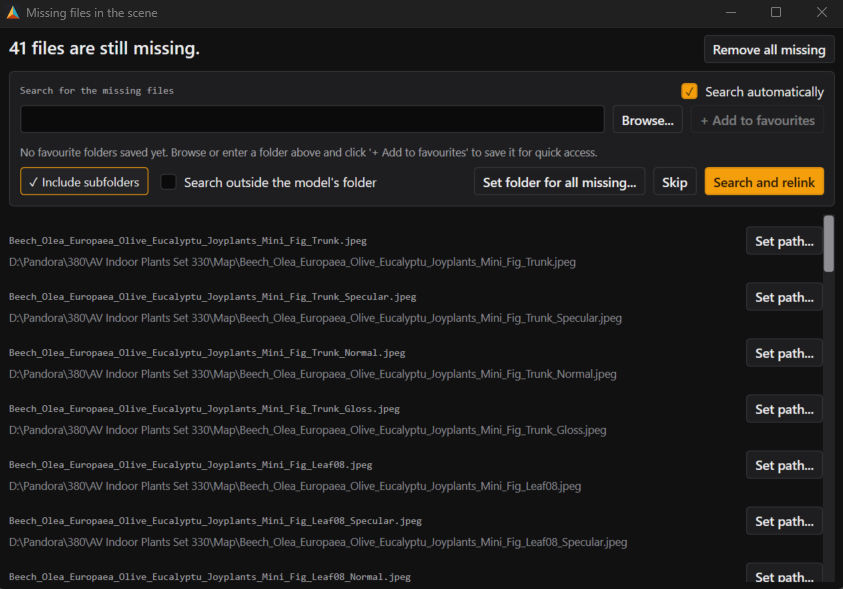
Missing maps, found and fixed.
Relink missing maps across your library without opening each file, or every missing texture, proxy and IES file in the open scene.
- Relink across your library
- Relink the open scene
- Suggested matches
04 · Model Prep · SAM app
Know every model's real size.
SAM recognises each model, checks its real size and sets aside anything that looks wrong. Your originals are never changed.
- Real size check
- Model type
- Originals never changed
05 · Scene tools · 3ds Max
The scene fixes you'd otherwise script.
Clean geometry and CAD splines, set pivots, rename, swap materials and get a scene ready for Unreal or Unity. Built for heavy scenes, from the SAM menu in 3ds Max.
Built for heavy scenes
Native speed, inside 3ds Max.
The heavy work in Scene tools runs on SAM's own C++ engine, so checks and fixes keep up with big, inherited scenes instead of stalling them.
Geometry
Find and fix mesh problems, weld vertices, fix smoothing and normals.
Shapes
Clean, join, split and resample CAD splines.
Transfer
Set pivots, and copy pivots, modifiers and materials to other objects.
Selection
Select by material, layer, colour, name or likeness; hide and freeze.
Modifiers
Add, remove and collapse modifiers on many objects at once.
Replace and Display
Swap copies for instances; set display, render and lock flags.
Lights
Switch, dim, colour and randomise many lights at once.
Rename
Rename many objects with a live preview.
Snap Align
Align one object to another by picking points.
Archive
Collect textures, proxies and XRefs into one folder or zip.
XRefs
Load, reload, remove and merge scene XRefs.
Engine Export
Check a scene for Unreal or Unity, make LODs and export.
SAM menu
Scene Doctor
Scan a scene for junk, bad pivots and missing textures, and preview each fix first.
SAM menu
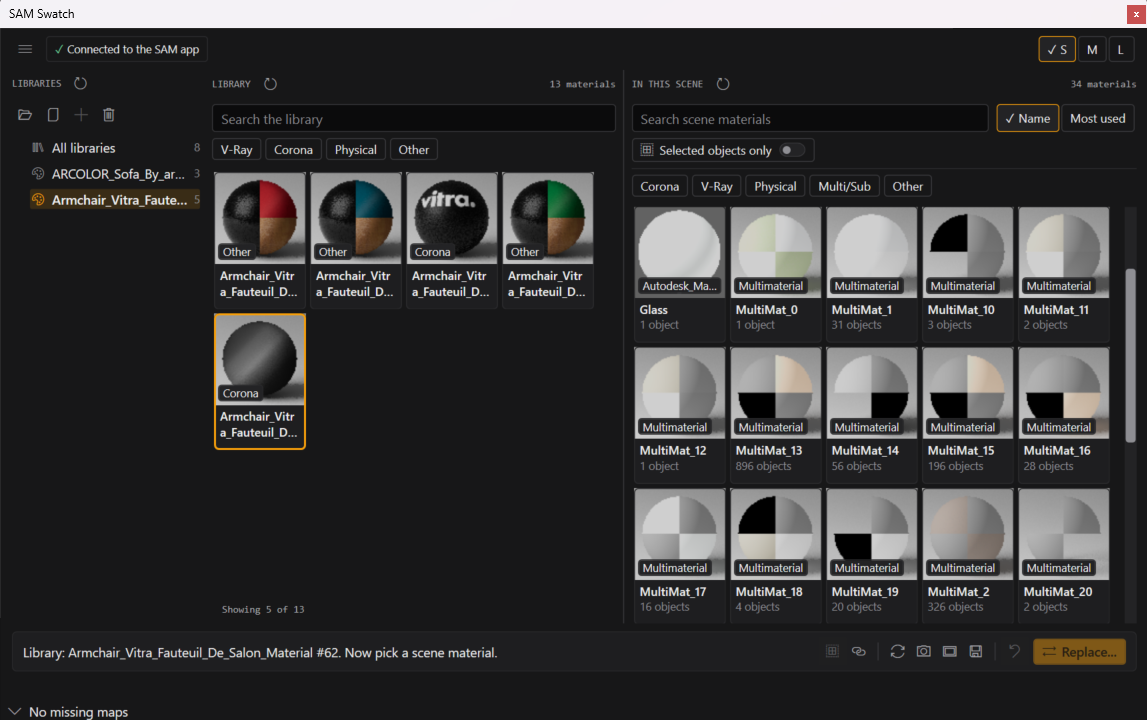
Swatch
Swap a material across every object and Multi/Sub slot at once.
SAM menu
Add Selection to Library
Save part of a scene as a clean model in your library.
Every command is searchable inside Scene tools, and on this page.
In 3ds Max
Fix the scene without leaving Max.
The windows you reach for on every inherited or downloaded scene.
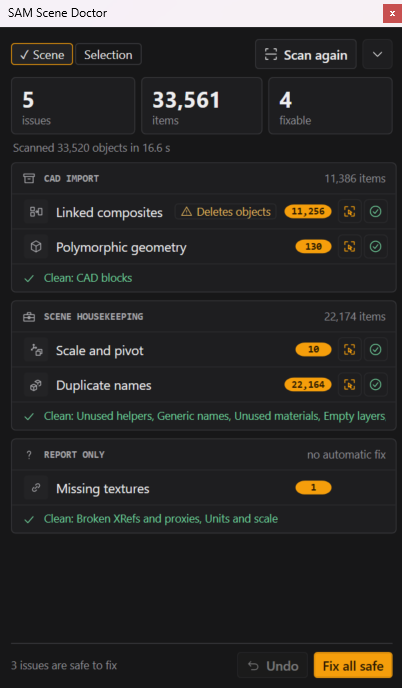
Scene Doctor
Scan a scene for junk, bad pivots and missing textures, and preview each fix first.
06 · Set Builder · SAM app
Describe the room, get the sets.
SAM assembles two or three matching sets from your own library, oriented and ready to place in 3ds Max as normal, editable objects.
- Describe the room
- Two or three matching sets
- Swap or lock any item
- See what your library is missing
- Polygon count per set
- Place it in 3ds Max
Free tools
Free tools for 3dsky and 3ds Max.
Find a feature
Does SAM do it?
Search for the job you have in mind and see where SAM does it, in the app or in 3ds Max.
74 features
Download your 3dsky purchases
SAM app › Downloads
Unpack zip, rar and 7z
3dsky downloads without the unzipping and renamingSAM app › Downloads
File by your folder rules
3dsky downloads without the unzipping and renamingSAM app › Downloads
Queue purchases from Chrome
SAM app › Downloads
Add the folders you already have
SAM vs Connecter: which asset manager fits a 3ds Max artist?SAM app › Library
Search by words
SAM app › Library
Search by a reference image
SAM app › Library
Suggested tags
SAM app › Library
Every format in one card
SAM app › Library
Renderer at a glance
SAM app › Library
Previews for every model
SAM app › Library
Missing-file badges
SAM app › Library
Drag a model into your scene
SAM app › Library
Add Selection to Library
3ds Max › Library
Relink across your library
How to relink 3ds Max files without opening themSAM app › Relink
Relink the open scene
3ds Max › Relink
Suggested matches
SAM app › Relink
Real size check
3dsky models never arrive consistent: the fixSAM app › Model Prep
Model type
SAM app › Model Prep
Originals never changed
SAM app › Model Prep
Describe the room
SAM app › Set Builder
Two or three matching sets
SAM app › Set Builder
Swap or lock any item
SAM app › Set Builder
See what your library is missing
SAM app › Set Builder
Polygon count per set
SAM app › Set Builder
Place it in 3ds Max
SAM app › Set Builder
Scan the scene
3ds Max › Scene Doctor
Preview each fix first
3ds Max › Scene Doctor
Swap a material everywhere
3ds Max › Swatch
Material libraries beside the scene
3ds Max › Swatch
Drag materials onto objects
3ds Max › Swatch
Search every command
3ds Max › Scene tools
Find mesh problems
3ds Max › Scene tools › Geometry
Fix mesh problems
3ds Max › Scene tools › Geometry
Weld vertices
3ds Max › Scene tools › Geometry
Fix smoothing
3ds Max › Scene tools › Geometry
Flip and unify normals
3ds Max › Scene tools › Geometry
Select objects by problem
3ds Max › Scene tools › Geometry
Clean CAD splines
3ds Max › Scene tools › Shapes
Weld and chain splines
3ds Max › Scene tools › Shapes
Attach shapes by layer, colour or material
3ds Max › Scene tools › Shapes
Detach, explode and break
3ds Max › Scene tools › Shapes
Resample and subdivide splines
3ds Max › Scene tools › Shapes
Round or chamfer corners
3ds Max › Scene tools › Shapes
Outline and conform splines
3ds Max › Scene tools › Shapes
Flatten splines
3ds Max › Scene tools › Shapes
Align pivots
3ds Max › Scene tools › Transfer
Copy and paste pivots
3ds Max › Scene tools › Transfer
Copy modifiers to other objects
3ds Max › Scene tools › Transfer
Copy materials to other objects
3ds Max › Scene tools › Transfer
Select by material, layer or colour
3ds Max › Scene tools › Selection
Select similar objects
3ds Max › Scene tools › Selection
Select and set G-Buffer IDs
3ds Max › Scene tools › Selection
Hide and freeze
3ds Max › Scene tools › Selection
Add or remove modifiers on many objects
3ds Max › Scene tools › Modifiers
Collapse stacks
3ds Max › Scene tools › Modifiers
Modifier manager
3ds Max › Scene tools › Modifiers
Quick UV box map
3ds Max › Scene tools › Modifiers
Swap copies for instances
3ds Max › Scene tools › Replace and Display
Find similar objects
3ds Max › Scene tools › Replace and Display
Proxy display for V-Ray and Corona
3ds Max › Scene tools › Replace and Display
Render and display flags
3ds Max › Scene tools › Replace and Display
Lock transforms and cameras
3ds Max › Scene tools › Replace and Display
Switch many lights at once
3ds Max › Scene tools › Lights
Set intensity and temperature
3ds Max › Scene tools › Lights
Randomise lights
3ds Max › Scene tools › Lights
Rename many objects
3ds Max › Scene tools › Rename
Snap align by picking points
3ds Max › Scene tools › Snap Align
Collect a scene into one folder or zip
3ds Max › Scene tools › Archive
Handle duplicate file names
3ds Max › Scene tools › Archive
Manage XRefs
3ds Max › Scene tools › XRefs
Check a scene for Unreal or Unity
3ds Max › Scene tools › Engine Export
Generate LODs
3ds Max › Scene tools › Engine Export
Export FBX or Datasmith
3ds Max › Scene tools › Engine Export
- Windows 10 or 11, 64-bit
- 3ds Max 2025, 2026 or 2027
- One installer, one licence
Questions
Anything else? Ask us.
Get your library sorted.
Join the waitlist for early access. Artists and freelancers: the first 100 to join by 30 November get 30% off Pro for life. Studios of 3 or more: apply for free beta access.